
Hero Summary
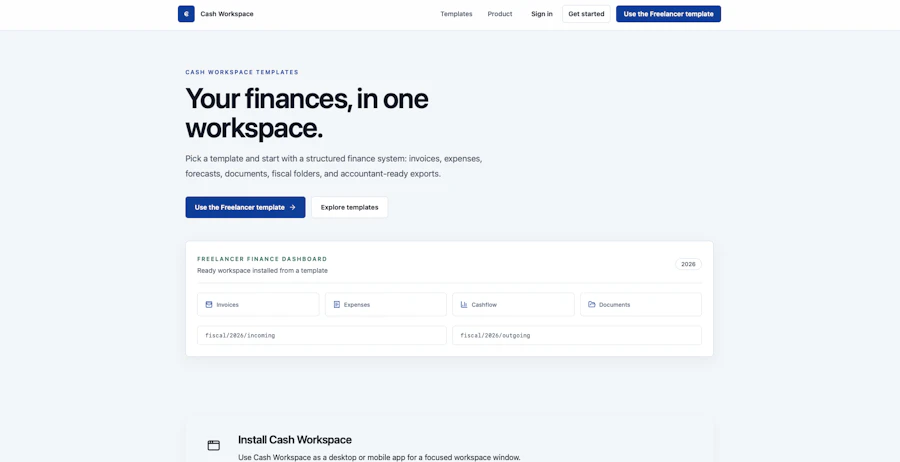
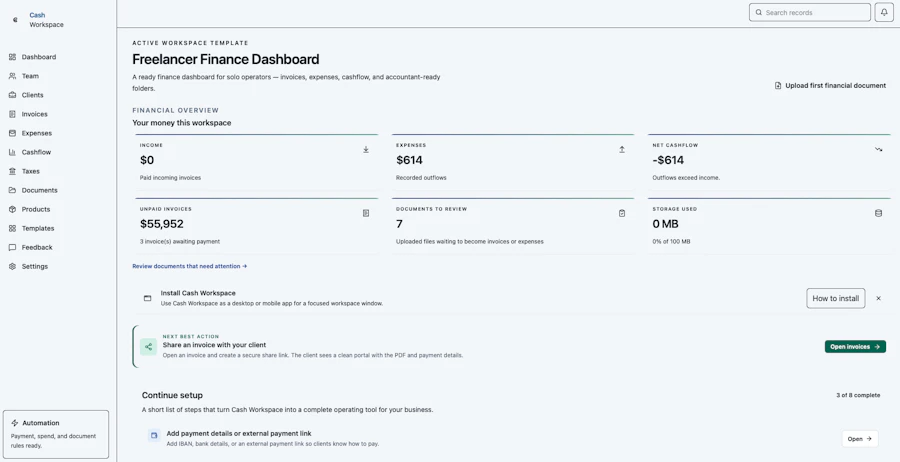
Cash Workspace is a finance tool designed specifically for freelancers, small teams, and creative agencies. It consolidates essential financial tasks such as organizing invoices, tracking expenses, managing receipts, and preparing tax records, all in one intuitive platform. This tool aims to simplify year-end financial processes, making it easier to maintain visibility over your fiscal activities.
The platform is particularly beneficial for those who juggle multiple clients or projects, as it provides a structured environment to keep financial documents organized. With features geared towards modern workflows, including AI-assisted processes, Cash Workspace caters to users who prefer a clean and efficient approach to financial management.
Quick Verdict
Cash Workspace is worth considering for freelancers and small teams who want a free, organized, and user-friendly finance tool. However, its limited community feedback and lack of advanced features might not satisfy everyone.
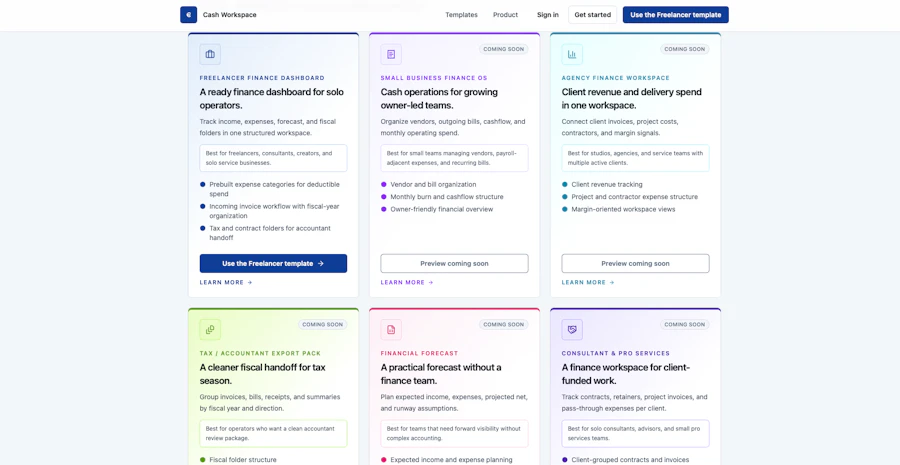
Best For / Not Recommended For
- ✅ Freelancers managing multiple clients
- ✅ Small creative agencies
- ✅ Individuals seeking a free finance tool
- ✅ Users looking for a simple interface
- ❌ Large businesses with complex financial needs
- ❌ Users requiring advanced reporting features
- ❌ Those needing extensive support resources
- ❌ Teams that prefer integrated systems with other software
Key Specifications
| Feature | Details |
|---|---|
| Invoice Management | Organize and track invoices easily. |
| Expense Tracking | Record and categorize expenses efficiently. |
| Receipt Management | Store and retrieve receipts in a digital format. |
| Contract Storage | Keep contracts organized and accessible. |
| Tax Preparation | Prepare and organize tax documents. |
| Accountant-Ready Exports | Export documents in formats suitable for accountants. |
Pricing Snapshot
| Tiers | Features |
|---|---|
| Free | Access to all basic features, no cost. |
Pros & Cons
- ✅ Completely free to use
- ✅ Simple and clean user interface
- ✅ Good for basic financial needs
- ✅ AI-assisted workflows enhance productivity
- ⚠️ Limited advanced features
- ⚠️ Minimal community support and resources
- ⚠️ Not suitable for complex financial tasks
- ⚠️ Lacks integrations with other software
Community Sentiment
With only 3 votes on Product Hunt, Cash Workspace hasn't gained significant traction yet. User sentiment appears cautious, indicating a need for more engagement and feedback from the community.
Benchmark References
When compared to alternatives like Wave or FreshBooks, Cash Workspace falls short in advanced financial features and reporting capabilities. While it shines in its straightforward approach, those needing deeper insights or integration options will likely find competitors more appealing.
For users seeking a thorough financial solution, tools like QuickBooks offer far more in terms of functionality, albeit at a price. Cash Workspace's free model is attractive, but it sacrifices depth for simplicity, which may not suit everyone.
Comparison Table
| Feature | Cash Workspace | Wave | FreshBooks | QuickBooks |
|---|---|---|---|---|
| Price | Free | Free | Starting at $15/month | Starting at $25/month |
| Invoice Management | Yes | Yes | Yes | Yes |
| Expense Tracking | Yes | Yes | Yes | Yes |
| Reporting Features | No | Basic | Advanced | Advanced |
| Integration Options | None | Limited | Extensive | Extensive |
Use-Case Recommendations
Freelancer Invoicing
Freelancers can use Cash Workspace to create and manage invoices for various clients, ensuring they are organized and easily accessible for payment tracking.
Expense Tracking for Creatives
Artists and creators can log expenses related to projects, keeping financial records tidy and ready for tax season without hassle.
Small Team Financial Management
Small teams can use Cash Workspace to consolidate financial documents, making collaboration easier and year-end processes more manageable.
Reliability & Durability Insight
Cash Workspace exhibits good uptime, but user feedback suggests that support options are limited. For a free tool, it’s important to manage expectations regarding response times and assistance.
Common Complaints
- Lack of customer support resources
- Absence of advanced reporting features
- Limited integration capabilities
- Minimal community engagement
Price-to-Value Analysis
Cash Workspace offers excellent value for freelancers and small teams who need a basic finance tool without financial commitment. However, its lack of advanced features means that those with more complex needs may not find the same return on investment.
Alternatives
- Wave - Free accounting software with invoicing features.
- FreshBooks - Feature-rich invoicing tool ideal for small businesses.
- QuickBooks - Thorough accounting software for larger needs.
- Zoho Books - Affordable accounting solution with solid features.
- Xero - Popular among small businesses for its user-friendly interface.
Frequently Asked Questions
Is Cash Workspace truly free?
Yes, Cash Workspace offers its services free of charge, making it accessible for freelancers and small teams.
Can I export my financial data?
Yes, Cash Workspace allows you to export accountant-ready financial documents.
Does it integrate with other software?
No, currently, Cash Workspace does not offer integration options with other financial software.
Is there customer support available?
Support resources are limited, so users may need to rely on community feedback and documentation.
Source Transparency
This review is based on user feedback, product specifications, and comparison data from multiple finance tool sources.
Confidence Level
Medium confidence due to limited community engagement and feedback.
Wait or Buy?
If you're a freelancer or small team looking for a straightforward financial tool, give Cash Workspace a try. If your needs are more complex, consider waiting for additional features or looking into alternatives.
Last Verified
May 2026. Check for current details.
Editorial Integrity
This review is independent and aims to provide unbiased opinions based on available data.