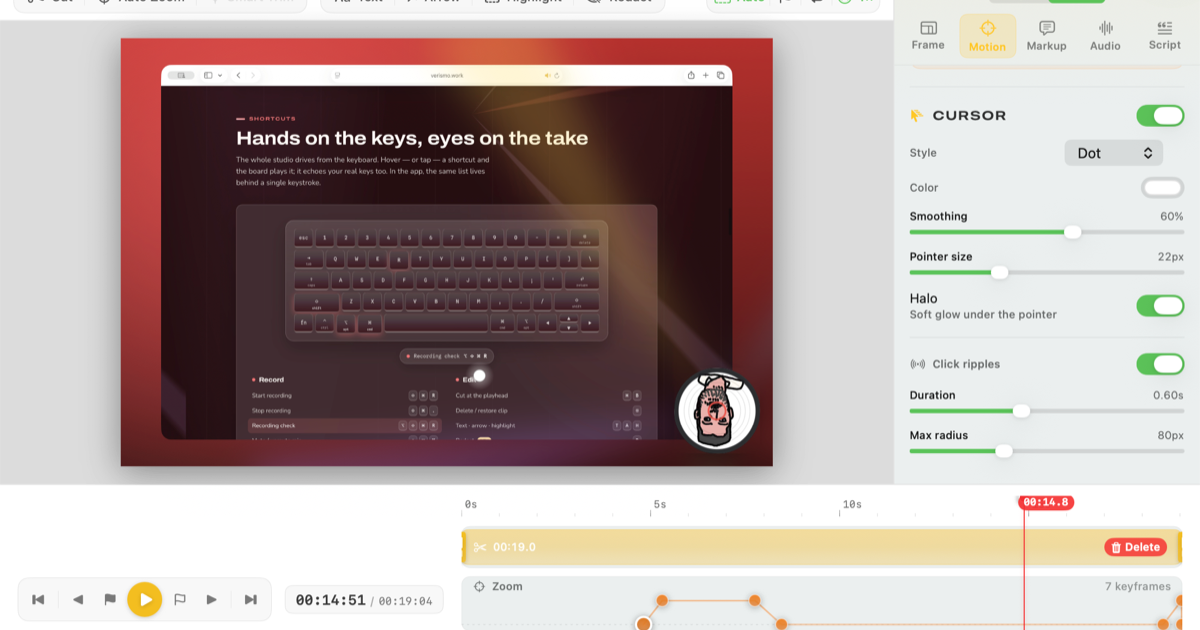
Hero Summary
Verismo is an innovative AI tool designed to simplify screen recording and video creation. With its user-friendly interface and high-quality output, it aims to simplify the filmmaking process for users of all levels.
Quick Verdict
Verismo is worth considering for casual users and beginners who want an accessible tool for screen recording and video editing. However, professionals might find its limited integrations and early development stage a drawback.
Best For / Not Recommended For
Best For
- Casual users looking for an easy way to create videos.
- Beginners who need a straightforward tool for screen recording.
- Educators wanting to create instructional videos without a steep learning curve.
Not Recommended For
- Professional video producers seeking advanced features and integrations.
- Users needing extensive customization options for their video projects.
Key Specifications
| Feature | Details |
|---|---|
| API | No |
| Integrations | Limited |
| Free Tier | Available with basic features |
| Video Output Quality | High |
| Development Stage | Early |
Pricing Snapshot
Verismo offers a free tier with basic features suitable for casual users. The Pro version is available for $0 per month, unlocking additional functionalities and high-quality outputs, making it an attractive option for beginners.
Pros & Cons
Pros
- User-friendly interface simplifies video creation.
- High-quality output makes for professional-looking videos.
- Free trial available, allowing users to test the features before committing.
Cons
- Limited integrations with other tools and platforms.
- Still in early development, leading to potential bugs.
- Some advanced features may be lacking for professional users.
Community Sentiment
Verismo received mixed reactions during its Product Hunt launch, with initial feedback highlighting its ease of use but also pointing out concerns about its limitations and early development status. Users appreciate the potential but seek further enhancements.
Benchmark References
Performance data is limited as Verismo is still in early stages. Users report satisfactory performance for basic tasks, but more extensive public benchmarks are needed for a thorough analysis.
Comparison Table
| Competitor | Best At | Price | Free Tier |
|---|---|---|---|
| ScreenFlow | Advanced editing features | $149 | No |
| Camtasia | Professional screen recording | $249 | No |
| OBS Studio | Open-source flexibility | Free | Yes |
Use-Case Recommendations
Use This If..
- You want a straightforward tool for creating instructional content.
- You are a beginner looking to explore video editing without complexity.
- You need a free option to handle basic screen recordings.
Use Something Else If..
- You are a professional content creator needing advanced editing capabilities.
- You require extensive integrations with other software.
Reliability & Durability Insight
Verismo is in its early development phase, which may affect its reliability. However, the company is actively working on updates and improvements, aiming to enhance product maturity over time.
Common Complaints
- Users report occasional bugs due to the early development phase.
- Limited integrations make it difficult to use alongside other tools.
- Some users desire additional features that are common in more mature software.
Price-to-Value Analysis
With a free tier available, Verismo offers a good return on investment for casual users and beginners. However, professionals might find the value lacking compared to more solid alternatives.
Alternatives
- ScreenFlow: Use for advanced editing features and professional output.
- Camtasia: Ideal for thorough screen recording and editing needs.
- OBS Studio: Best for users seeking a free, open-source solution with extensive customization.
Frequently Asked Questions
Is Verismo free to use?
Yes, Verismo offers a free tier with basic features for users to try.
Can I integrate Verismo with other software?
Currently, Verismo has limited integrations with other tools and platforms.
What is the output quality of videos created with Verismo?
Verismo provides high-quality output suitable for various video projects.
Is Verismo suitable for professional use?
While it is user-friendly, professionals may find it lacking in advanced features and integrations.
Source Transparency
This review is based on Product Hunt data (3 upvotes), public documentation, and category analysis. It is not sponsored.
Confidence Level
Confidence: Medium, While the initial features are promising, the tool's early development stage raises questions about its long-term viability and functionality.
Wait or Buy?
Try free, Verismo's free tier makes it worth testing for casual users and beginners, but waiting for more features and stability may be advisable for professionals.
Last Verified
Information verified: May 2025. Check verismo.work for current details.
Editorial Integrity
This is an independent editorial review. Verismo had no editorial approval over the content.