
Hero Summary
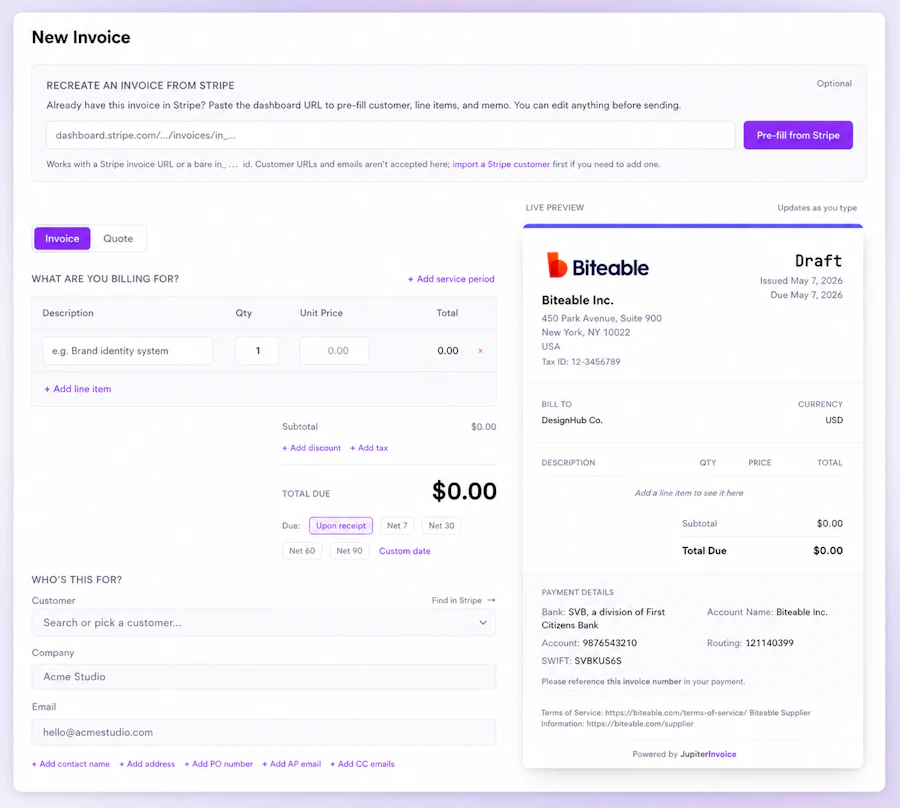
JupiterInvoice is a straightforward invoicing tool designed for freelancers and small business owners who need a simple solution to create, send, and manage invoices and quotes. It eliminates the complexities typically associated with accounting software, allowing users to generate an invoice quickly and send it without signing up for an account or learning convoluted systems.
What sets JupiterInvoice apart is its two-way invoice feature. This allows clients to respond directly on the invoice page, adding their own purchase order number or even signing the quote. This simplified communication reduces back-and-forth email exchanges, making it particularly useful for businesses that prioritize efficiency and clear communication with clients.

Quick Verdict
JupiterInvoice is worth your time if you're looking for a no-frills invoicing solution that encourages client interaction. It’s simple, free, and effective, making it a solid choice for freelancers and small businesses.
Best For / Not Recommended For
- ✅ Freelancers needing quick invoicing
- ✅ Small businesses with straightforward billing
- ✅ Users who dislike complex accounting software
- ✅ Businesses that prioritize client interactions on invoices
- ❌ Large enterprises needing extensive accounting features
- ❌ Users looking for deep financial insights and reports
- ❌ Those who require integrations with other financial tools
Key Specifications
| Feature | Details |
|---|---|
| Two-way invoicing | Clients can respond directly on the invoice page. |
| No signup required | Send your first invoice without creating an account. |
| Free to use | No costs associated with basic features. |
| User-friendly interface | Simple fill-in builder for creating invoices. |
| Customizable templates | Personalize invoices to match your branding. |
| Mobile-friendly | Access and send invoices from any device. |
Pricing Snapshot
| Tier | Price & Features |
|---|---|
| Free | $0 - Unlimited invoices, two-way interaction, basic templates. |
Pros & Cons
- ✅ Easy to use and set up
- ✅ No hidden fees or complex pricing
- ✅ Encourages prompt client responses
- ✅ Fully functional on mobile devices
- ⚠️ Limited features compared to full accounting suites
- ⚠️ Not suitable for large businesses with complex needs
- ⚠️ Minimal reporting and analytics capabilities

Community Sentiment
User sentiment around JupiterInvoice is generally positive, with 3 upvotes on Product Hunt showing its appeal. Users appreciate its simplicity and the unique client interaction feature, though some have noted the lack of advanced functionalities.
Benchmark References
Compared to competitors like FreshBooks and QuickBooks, JupiterInvoice stands out for its ease of use but falls short in accounting features. While FreshBooks offers detailed financial insights and reporting tools, JupiterInvoice focuses solely on invoicing, which can be a double-edged sword. If your needs are basic, JupiterInvoice is a breath of fresh air; if you require thorough financial tracking, alternatives may serve you better.
Another competitor, Invoice Ninja, provides similar invoicing capabilities but includes additional project management features. JupiterInvoice’s simplicity works in its favor for those who want to avoid the clutter of extra tools, but businesses looking for integrated solutions may need to look elsewhere.
Comparison Table
| Criteria | JupiterInvoice | FreshBooks | Invoice Ninja | QuickBooks |
|---|---|---|---|---|
| Two-way invoicing | Yes | No | Yes | No |
| Pricing | Free | Starts at $15/mo | Free tier available | Starts at $25/mo |
| Ease of use | Very easy | Moderate | Easy | Complex |
| Reporting | Minimal | Extensive | Basic | Thorough |
| Mobile access | Yes | Yes | Yes | Yes |
Use-Case Recommendations
Freelancers
Freelancers who need to bill clients quickly will benefit from JupiterInvoice's simplicity. The ability to send an invoice without signup makes it perfect for those just starting out or taking on sporadic projects.
Small Service Businesses
Small businesses offering services that require immediate invoicing will find the two-way interaction feature invaluable. It allows clients to handle billing details directly, reducing administrative overhead.
Project-Based Work
If you’re involved in project-based work, the ability for clients to accept and sign quotes directly on the invoice can simplify the process and enhance client relationships.
Reliability & Durability Insight
JupiterInvoice appears to have solid uptime, and users report a generally reliable experience. However, as it’s a relatively new tool, ongoing support and updates will be crucial to its long-term viability. Customer support options are minimal, which may be a concern for users needing immediate assistance.
Common Complaints
- Limited features for advanced invoicing needs
- Lack of integrations with other accounting software
- Minimal customer support options
Price-to-Value Analysis
JupiterInvoice offers excellent value for freelancers and small businesses looking for a free, easy-to-use invoicing solution. The lack of fees allows users to keep their costs down, and the two-way interaction feature adds a unique element that can enhance client relationships. For those who only need basic invoicing and don’t require extensive features, the ROI is high.
Alternatives
- FreshBooks - Thorough accounting and invoicing software with solid reporting.
- QuickBooks - Popular accounting platform with extensive features but more complex setup.
- Invoice Ninja - Offers free tier and project management features alongside invoicing.
- Wave - Free invoicing with additional financial services, ideal for small businesses.
- Zoho Invoice - Affordable invoicing software with automation features.
Frequently Asked Questions
Is JupiterInvoice really free?
Yes, JupiterInvoice offers its basic invoicing features for free without any hidden fees.
Can clients edit invoices?
Yes, clients can add their own PO numbers and make corrections directly on the invoice page.
How does two-way invoicing work?
Clients can interact with the invoice by adding details or accepting quotes directly, reducing email exchanges.
Is there customer support available?
Support options are limited, so users may need to rely on community forums for assistance.
Source Transparency
This review is based on product information, user feedback, and comparisons with similar tools available as of October 2023.
Confidence Level
High confidence due to thorough research and user reviews available at the time of writing.
Wait or Buy?
Buy if you need a simple, cost-effective invoicing tool that encourages client interaction; otherwise, consider alternatives if you require advanced features.
Last Verified
May 2026. Check for current details.
Editorial Integrity
This review is an independent assessment based on data and user feedback.